Multi-touch Revenue Attribution
You lock one attribution model — first-touch, last-touch, linear, U-shaped, W-shaped, or time-decay — and get a monthly dashboard that credits closed-won revenue across your marketing touches under that model. You confirm what counts as a touch, the event that earns credit, and the lookback window, then lock the configuration. Every monthly refresh replays the locked setup against fresh data, so the numbers don't drift between runs and the lineage stays logged.
The agent applies the model you chose faithfully. Whether that model is the right one for your business is your judgment.
What you'll see
A locked monthly dashboard, built in about 21 minutes: four KPI tiles and four core widgets, plus views that appear when your data supports them.
- Credited revenue by channel — closed-won revenue split across your channels, using the model and lookback you locked.
- Credited revenue by campaign — the same credit, by campaign. Touches with no campaign show as "(no campaign)" so the gap stays visible.
- Credited revenue over time — credited revenue trended by month, with the top channels and an "Other" rollup.
- Underlying deals — the audit table. One row per deal: credited revenue, top channel, top campaign, touch count, and whether any touch earned credit.
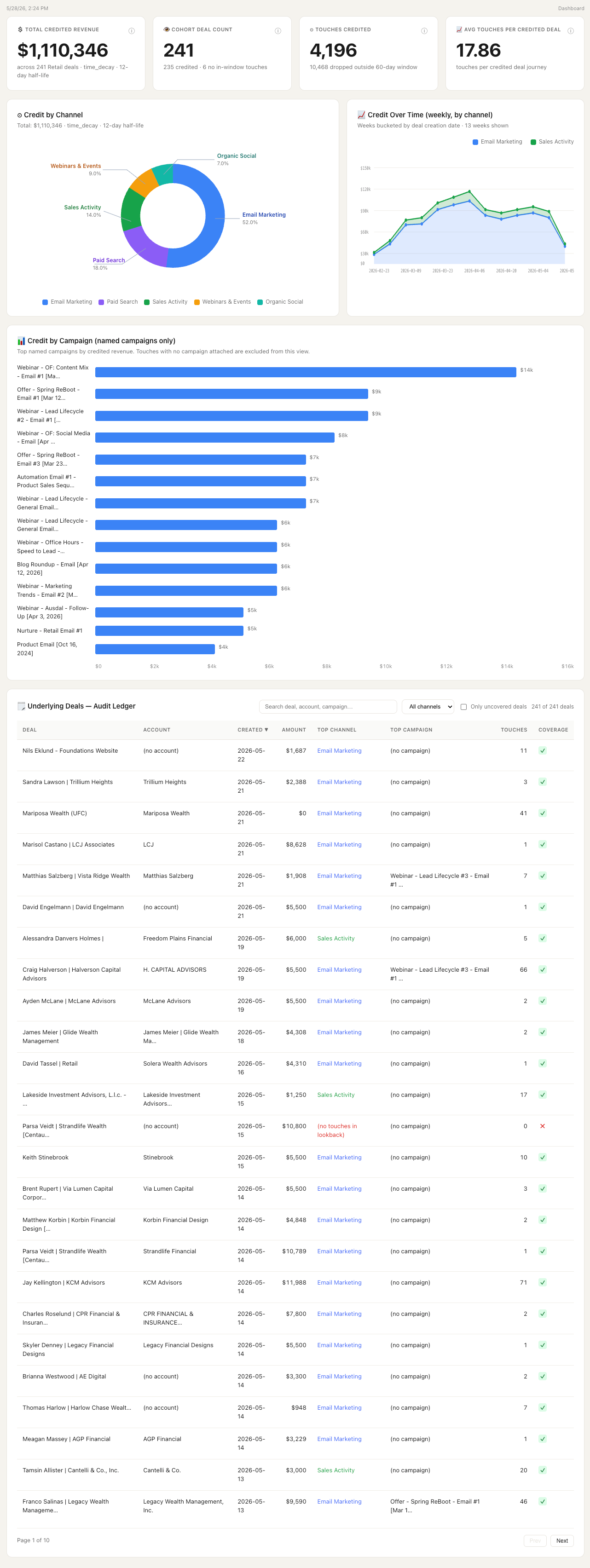
Three conditional views appear when your data calls for them: outbound mix, account-level credit, and anonymous-touch coverage. Every credited dollar traces in two clicks back to the touches, the rules, and the query behind it.
Before you run it
Required:
- A CRM (Salesforce or HubSpot) with closed-won opportunities and opportunity-contact roles
- Marketing automation (HubSpot) feeding marketing touches
Recommended:
- Ad platforms (Google, LinkedIn, Meta) and sales engagement (Salesloft, Outreach), which deepen the touch graph
If a required source isn't connected, the agent stops before running and names it. See CRM Integrations and MAP Integrations for setup.
What the agent asks you
Seven questions, plus more if your data calls for them. Attribution decisions are consequential, so the agent prefills what it can detect, and you confirm, edit, and review the full plan before anything builds. Read the plan carefully on the first run and lock it; every monthly refresh replays it.
| Question | Why it matters | Default |
|---|---|---|
| Which attribution model should we lock? | How credit is distributed across touches | Prefilled; you confirm |
| Which systems count as a touch? | Marketing automation, ad-platform engagement, sales activities, or a combination | Prefilled from your connected sources |
| What event earns credit? | Closed-won, opportunity creation, SQL stage reached, or a custom stage | Closed-won |
| Which revenue field do we credit? | Amount, or another detected revenue field | Amount |
| How far back do we look for touches? | How far back a touch can sit and still earn credit | Prefilled from your sales cycle |
| How do raw source values roll up to channels? | Confirm or edit the source-to-channel mapping | Prefilled by match; you review |
| Anything custom we should know? | A free-text note about anything unusual in your setup | — |
How to read the result
Each dollar shown is the model-allocated portion of a closed-won deal.
The breakdown spans channels (the canonical buckets you confirmed in the source-to-channel mapping), campaigns (with "(no campaign)" kept visible rather than hidden), and months (top channels plus an "Other" rollup). The conditional views explain the deltas: how much credit came from outbound, what changes at the account level, and how much of your touch graph is anonymous.
Known limits you'll see:
"We applied the attribution model you chose faithfully to your data. We do not validate whether the model is correct for your business — that is your team's judgment." Always active.
"Touches outside the [N]-day lookback window are excluded. [Y]% of touches in your data fall outside this window and contribute no credit." Surfaces when a meaningful share falls outside the window.
"Only [N]% of your touches are tagged with a touch_system." Surfaces when touch tagging coverage is thin.